OpenTray v0.24~0.28: improved window experience, expanded navigation control, a more stable kernel
One window session now holds any number of native webviews, with layouts declared as data and solved natively; the navigation toolbar is composed natively, and embedding-hostile sites and sites behind logins both work. Navigation can be observed before it happens and blocked (navigationAction events, declarative block rules, site-icon observation). After the kernel switched to push, idle windows went from 121 commands every 2 seconds to zero.
この記事は英語で書かれています。 中国語版を読む →
$ npm view create-opentray version
0.28.0
OpenTray 0.24.0 through 0.28.0, ten versions in one post, three themes: a window can lay out multiple native WebViews, and the navigation toolbar became a native composition; WebView navigation can be observed before it happens and blocked; and the kernel switched from polling to push, so an idle window issues no commands at all. The rest is browser compatibility, stability fixes, and a nine-language wizard. The previous post covered through 0.23.0; this one groups the whole range by theme, and the link bar lists a permanent link for every release.
Multiple pages in one window (0.25.0)
A window session holds any number of sibling webviews: createWebview creates, destroyWebview destroys, listWebviews lists. Each webview has its own navigation (back / forward), focus, and getUrl / getTitle queries. A window is no longer one WebView in a shell; it is a container you lay out freely.
Layouts are data; the native side solves them
JS declares what it wants and never computes coordinates. The layout is data; the native side is the solver.
The interface has three layers. win.setLayout(document) submits the whole layout document; win.layout.update(id, patch) is a single-node increment (change the toolbar from 44px to 52px and nothing else); documents assemble with the row / column / view / fixed / grow sugar. fixed(id, height) pins a size, grow(id) fills the remaining space, and box is a pure paint primitive (backgrounds and rounded corners, no page).
import { column, fixed, grow } from "@opentray/ext-webview";

const win = tray.createWebviewWindow({ windowOnly: true, width: 1024, height: 720 });
await win.show();

const toolbar = await win.createWebview({
  id: "toolbar",
  url: "http://127.0.0.1:5173/toolbar.html",
  bridge: { webviewId: true, messageChannels: true },
});
const content = await win.createWebview({ id: "content", url: "https://news.ycombinator.com" });

await win.setLayout(column([fixed("toolbar", 44), grow("content")]));
await win.layout.update("toolbar", { height: 52 });   // single-node increment
On submit, Taffy solves the document natively in one transaction; a window resize triggers a native re-solve that applies new frames directly, with no round-trip through JS. When a layout is replaced, a webview still referenced by id in the new tree moves in place without its page reloading.
Solver mechanics
A document is ordered layers: a layer array, each layer one independent flex tree. Array order is the z-order; there is no
zIndexfield.The solve transaction also recomputes the overlay and titlebar safe-area projections per webview and re-registers drag regions.
One exclusivity rule: a window style that affects translucency (frameless, material) cannot host multi-webview composition, and applying such a style to a window that already holds multiple webviews is rejected the same way. Both reject with
multiwebview_unsupported_stylebefore any state changes (walkthrough evidence 2026-09-12).
Embedding-hostile sites work with the toolbar
--toolbar used to wrap the target page in an iframe shell, with two structural failures. GitHub, Google, and YouTube respond with X-Frame-Options or CSP frame-ancestors, and creation fell back to a plain window without a toolbar as soon as it saw them. Logins had their own problem: the shell's top-level origin is 127.0.0.1, the target site is third-party to it, and macOS WKWebView ships intelligent tracking prevention on by default, which refuses third-party cookies; sites behind a login looped.
The toolbar is now two webviews: a fixed 44px toolbar webview served by the app itself, with back/forward/reload and an address bar; below it, a content webview loads the target address as a top-level context. GitHub, Google, and YouTube work, and logins live in the content webview's own first-party storage and survive a restart. The address bar treats the content webview's urlChange events as its only source of truth; back and forward drive the native session history. New-window intents (a[target], window.open, middle-click, the context menu) open a popup owned by the same session.
The iframe browse wrapper and the frameEmbeddable probe are retired with it; --toolbar means the native toolbar. The old config field showAddressBar is ignored at parse time without an error.
npx create-opentray create --url https://news.ycombinator.com --toolbar
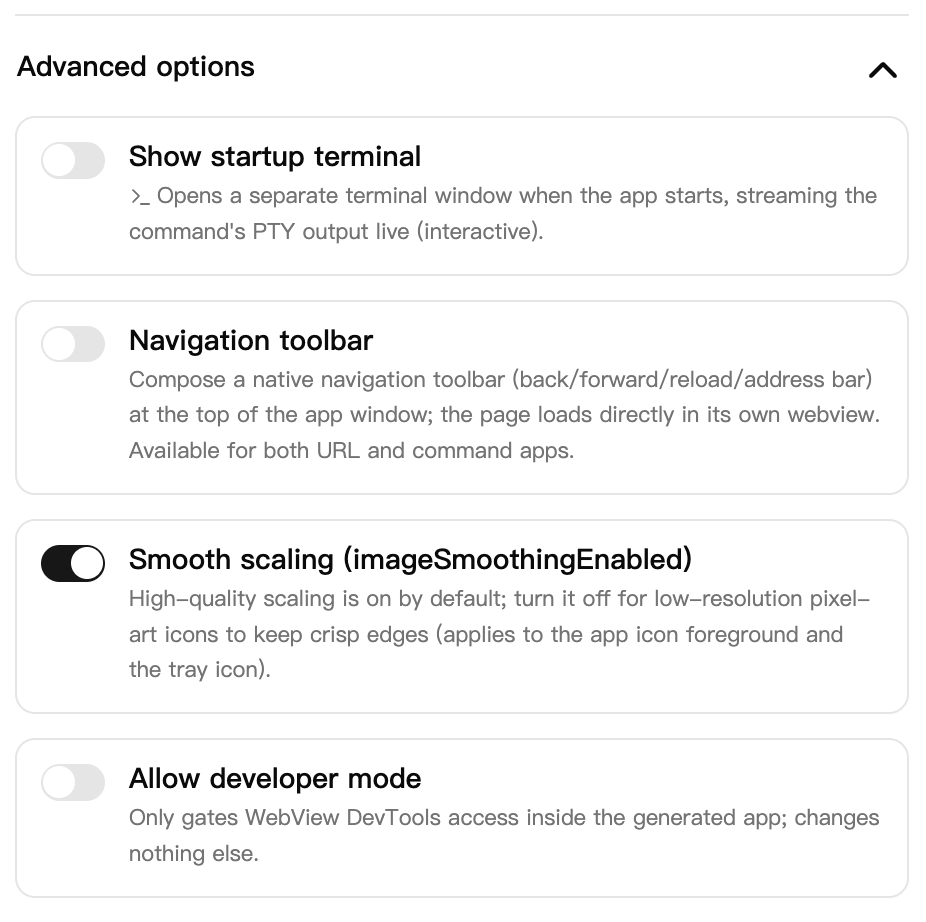
The wizard calls it "Navigation toolbar" and keeps it under Advanced options, off by default. URL apps and command apps can both enable it.
The official toolbar has no private interface; copy it in four steps
Create a
windowOnlywindow with two webviews: the toolbar webview withbridge: { webviewId: true, messageChannels: true }, the content webview with no bridge (an arbitrary page gets no capability by default).Compose once:
column([fixed("toolbar", 44), grow("content")]).The host subscribes to the content webview's
urlChange/titleChange/loadStateand forwards URL, title, and load progress to the toolbar page over the channel. The address bar keeps no state of its own; it renders whaturlChangepushes, and the progress bar isloadState-driven.Inputs and buttons in the toolbar page send commands back over the same channel; the host calls
content.navigate(url)/content.back()/content.forward(). Navigation, forward, and back are the content webview's native session history, not one the page maintains itself.
A different layout (a left sidebar beside content, a status strip on top) is a different layout document; more views are more createWebview calls and more channel targets.
Pages and the host talk over targeted channels
The host and bridged pages talk over message channels: createMessageChannel({ target }) opens one targeted connection. The lifecycle is created → open → closed(reason) → destroyed, with onClose observed exactly once. Queue bounds are exact: at most 1000 messages and 1 MiB cumulative payload per endpoint, counted as the bytes of each payload's RFC 8785 canonical serialization. The same value counts identically on every platform.
const channel = await win.createMessageChannel({ target: "toolbar" });
channel.onMessage((payload) => { /* already parsed, no manual JSON */ });
await channel.post({ kind: "navigate", url: "https://example.org" });
Per-webview bridge policy defaults to all-off: a policy-less child has no bridge capability, and an arbitrary content page gets no channel by default.
Sessions own exactly their own objects
Session ownership keys on the (appId, trayId, sessionId) tuple. A second window session for the same tray is rejected with the typed tray_session_active. Closing one session destroys exactly its own windows, webviews, channels, and popups, never another session's.
Every view pushes its own events
Every webview has one push-only event family, seven kinds in total: urlChange, titleChange, focused, geometryChange, loadState, navigationAction, faviconChange. loadState is the navigation lifecycle: started / finished / failed, carrying the target URL, an errorCode on failure, and a progress (0 to 1) on phases the platform can measure. No replay, no polling; every frame carries { windowId, webviewId, seq, ... }. Current values come from query commands: subscribe first, then query, then discard any event whose seq does not exceed the queried one, which resolves the subscription race.
See a navigation before it happens, and block it
navigationAction pushes one frame at every native navigation decision point, visible before the navigation happens: { url, navigationType, isUserInitiated? }. A link click, a form submit, a redirect: each is observable before it takes effect. navigationType is the platform-honest projection over link / form / backForward / reload / redirect / other. Windows distinguishes redirects exactly and classifies user-initiated navigations as link; macOS makes no redirect distinction and surfaces them as other.
It observes, and it blocks. Pass a set of declarative rules to createWebview; the native UI thread evaluates them synchronously, and a match cancels the navigation before it starts with a loadState failed carrying the stable error code 4500001:
const content = await win.createWebview({
  id: "content",
  url: "https://example.org",
  favicon: true,
  navigationRules: [{ pattern: "*://*.tracker.example/*", action: "block" }],
});

content.onNavigationAction((event) => { /* every decision point */ });
await content.setNavigationRules([]); // replace the whole set later
Patterns are URL globs: * matches any character run including separators; everything else is literal. A blocked navigation produces exactly one terminal frame (navigationAction followed by failed(4500001), never a started); the page stays put and later navigations are unaffected. Synchronous evaluation means no IPC round-trip and no race window.
Site icons on demand
Site icons (favicons) are a per-view capability switch in the same spirit: with favicon: true, faviconChange pushes each settled, actually-changed absolute http(s) href, and getFavicon() returns the { value: { href } | null, seq } query pair. A site script swapping the icon at runtime takes the same path as the initial one. Views created without the flag reject the query with favicon_disabled. A bridgeless content view stays bridgeless: the observation script grants the page nothing.
content.onFaviconChange((event) => { /* event.href is absolute */ });
const current = await content.getFavicon();
A toolbar can show site icons this way: subscribe to faviconChange, fetch and cache by href.
The kernel pushes; idle windows issue zero commands (0.27.0)
The 16 ms poll retired; extensions push
The host used to ask the native queue on a 16 ms timer whether anything new had arrived: every idle window issued 121 drain commands per 2 seconds, on both platforms.
That path is now a host-owned async port (EventPort). One measured run: 12 events, 0 consumer commands, broker metrics matching the tap counts exactly. drainWindowEvents, its native queue, and the facade interval are deleted; drain commands from idle windows went from 121 to 0. When urlChange or titleChange shows a sequence gap, the facade recovers with getUrl / getTitle, so coalesced state converges on the address bar's truth.
EventPort transport mechanics
Every
ext-*extension receives an immutable port whose thread-safetry_submitnever blocks native UI or transport; port identity is host-bound, and extensions submit only a tray route.Events classify as
Latest(coalescing state; a sequence gap triggers a query resync),Edge(backpressured, never silently dropped), orBestEffort.Per-source and global byte/record budgets with round-robin draining keep one extension from taking another's share.
The five per-view event families and the window family (focus/blur/visible/style/interaction/download) all ride that port on both platforms; app-reopen MRU tracking and app-mode reconciliation are push-driven too.
Old extensions keep the legacy response-flush behavior, and hosts report the active delivery mode, so a staged rollout never breaks lockstep.
Toolbar buttons no longer die
Messages from the page to the host (toolbar back/forward/reload/address jumps) enter a queue in the broker. The queue's only exit used to be the next host command's response. After the poll retired, an idle session issues no commands, so messages waited forever. The symptom: every toolbar button dead until a Dock click happened to trigger one command that flushed the queue.
Page-originated channel commands and document-navigation closes now push host-bound messages through the EventPort immediately, with no command in flight. Messages are user data and never drop silently: records the port cannot guarantee (over the single-record cap, retry queue full, no port attached) stay in the queue and ride the next command response. Reloading the toolbar page takes the same path: the channel close notifies the host immediately, which rebuilds the channel (300 ms debounce), reinstalls the command surface, and re-seeds the address bar. A reload used to kill every window button silently until an app restart (walkthrough evidence 2026-09-15).
Starts no longer wedge; exits leave no zombies
The same batch fixed a group of crashes and hangs.
Starts no longer wedge after kill -9. Bundle and launch locks carry a PID and a token; a start automatically reclaims locks whose owner is dead. No manual cleanup.
A late cleanup cannot destroy a newer session. Window and channel teardown validate the owner tuple, so a sweep that collected stale entries cannot hit a session that registered in between.
No zombies after broker death. Pending command requests reject, event subscriptions receive a terminal notice, and generated apps exit non-zero instead of serving a shell whose backend is gone. The terminal message is identical on every platform: Linux's
ECONNRESETand macOS's close ordering differ, but both now reportbroker connection closed, with the transport error oncause.One endpoint per app. The broker endpoint derives from the
appIdslug and display names never enter path segments; the same app reaches the same broker from a CLI open, a directnoderun, and a carrier cold start.Boot writes a narrative to app.log. Each bootstrap step records one structured line, and a failed start names the failing step in the log.
Other changes
WebViews identify as a standard browser by default. The bare WKWebView UA carries no browser token, which sent UA-sniffing portals into a same-URL reload loop at roughly 10 navigations per second (baidu.com was the reported case); appending the standard
Version/… Safari/…tokens by default makes the same window stable. New per-webviewbrowseroptions:userAgentas a full overridebrowserlikeUserAgentdefaulttrue(Windows already ships a full Edge UA, so this is a no-op there)incognitoandautoplaydefaultfalse
Context menu on toolbar pages. The
browser.contextMenuoption defaults by bridge surface: trusted shell UI like the toolbar hides the engine's context menu, so Reload and Inspect never appear on shell chrome, while a bridgeless content child keeps the ordinary browser menu. The first macOS implementation crashed at startup; it now suppresses inside the page: right-clicking anywhere on the toolbar does nothing, and the address bar's input/textarea/contenteditable keep the native menu with copy and paste.--openlaunches after create and replaces the running instance.create --openlaunches the materialized application after a successful apply (the default stays create-only;--openwith--dry-runstays dry). Open now probes for a running instance of the same app by argv identity, stops its process tree, waits bounded for the PID to release, and only then starts, instead of racing it for the broker session (walkthrough evidence 2026-09-14: a Dock-pinned carrier cold-started the old entry, the late--opendied, and the resurrected instance kept a stale shell with dead window buttons). A generated entry displaced by a cold launch steps aside cleanly: evidence goes toapp.log, exit code 0, no empty tray shell left behind.The wizard speaks nine languages. Simplified Chinese, Japanese, Korean, English, Arabic, French, Spanish, German, and Russian. Each catalogue is one complete typed object, with
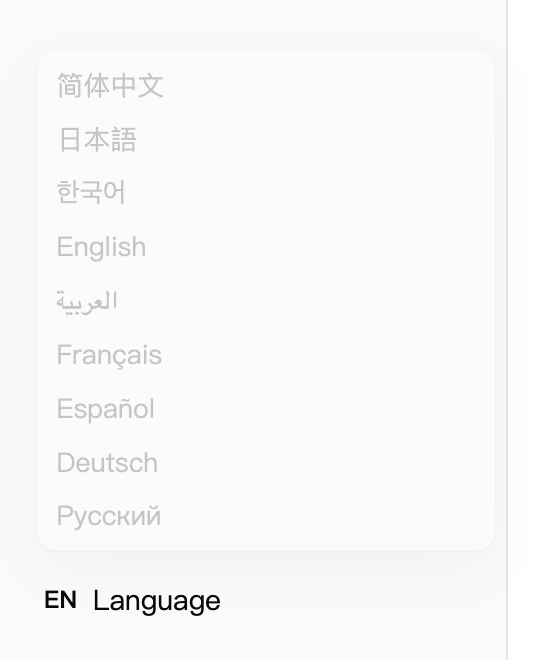
{token}placeholder parity enforced by tests. Server-emitted validation errors, fixed hints, and PTY guidance ride the same language channel (x-opentray-locale/lang=). The Arabic interface mirrors to RTL.
WebviewWindowHandle.setTitleis implemented. Generated command apps called it for the(detached)service-window marker; the method never existed on the handle, and every call threw silently.Icon generation in the packaged runtime is fixed. The glyph font (
inter-glyph.ttfwith its OFL notice) and the background PNGs used for icon composition ship in the published package, and the WASM image codec dependencies are declared; a registry install generates icons without a local checkout.Two raw-pointer FFI helpers in
opentray-specare markedunsafewith safety docs, clearing an error-level clippy lint.
183 commits after 0.23.0: 35 feat / 45 fix / 62 docs / 2 test / 28 chore, plus 8 merge, 2 refactor, and 1 style (counted by conventional-commit prefix). The only !-marked commit in the range is the 16 ms drain retirement (contract-3); the iframe browse-wrapper retirement is documented in the 0.25.0 changeset without !.
Upgrade
npm i create-opentray@0.28.0
npm i opentray@0.28.0          # SDK
With official extensions, pin one protocol line: pnpm add opentray@stable-A-B @opentray/ext-webview@stable-A-B (the line tag is published by @opentray/spec; do not mix it with latest).
The breaking change is --toolbar switching from the iframe wrapper to the native toolbar: the old config field showAddressBar is ignored without an error, and no migration action is required; already-frozen payloads keep the old behavior, and regenerating picks up the new carrier.
Links
Changelog: GitHub Release opentray@0.28.0 · opentray@0.27.7 · opentray@0.27.4 · opentray@0.27.3 · opentray@0.27.2 · opentray@0.27.1 · opentray@0.27.0 · opentray@0.26.0 · opentray@0.25.0 · opentray@0.24.0 · packages/create/CHANGELOG.md
Docs: opentray.jixoai.com · create README · ext-webview README
Upgrade: see the section above
Feedback: GitHub Issues
npm: opentray · create-opentray
On this blog: OpenTray v0.23.0 (2026-09-10, the iframe-toolbar release) · OpenTray v0.21.1
Chinese version: /zh/blog/2026-09-16-opentray-v0-24-v0-28/
